SendAI is a Chrome extension that adds a button inside Gmail. Add multiple recipients, write your message, set a delay — and it sends each email automatically, one by one.
From Chrome install to sending your first bulk campaign — takes less than 2 minutes.
Search "SendAI" on the Chrome Web Store and click Add to Chrome. The extension installs instantly — no account creation needed at this stage.
After installing, open Gmail in Chrome. A new SendAI button appears automatically in the Gmail interface. Click it to begin.
Create an account to access the platform. Register with your details and log in using your credentials.
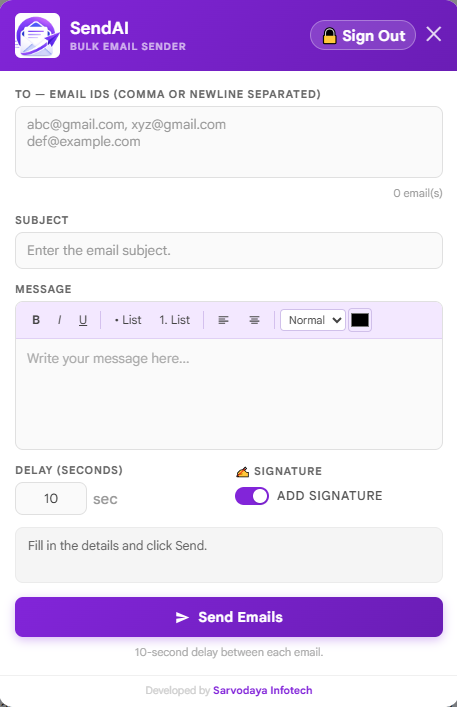
Enter multiple recipient email IDs (comma or newline separated), your subject line, message body, and the delay in seconds between each send.
SendAI automatically sends each email one by one with your set delay. Watch the live status update as emails go out. You can close the popup — it continues in the background.
Sending too many emails at once triggers Gmail's spam detection. Delays make your sends appear natural — protecting your account and improving deliverability.
Every recipient gets their own separate email from your Gmail — not a chain CC or BCC. More personal, more professional.
SendAI works directly with your Gmail account. Your emails go directly through your Gmail account.
Format your message with bold, italic, bullet lists, alignment and more — right inside the extension popup.
Built specifically for Gmail users who want to send bulk emails the right way.
Add unlimited email IDs — comma or newline separated. Each person gets their own individual email.
Set any delay in seconds between sends. Protects your Gmail account and keeps emails out of spam.
Bold, italic, underline, bullet lists, numbered lists, text alignment — full formatting inside the popup.
Toggle your Gmail signature on/off for bulk sends with a single switch.
See real-time progress: how many emails have been sent and how many are remaining.
Free to install. Works in your Gmail in under 60 seconds. No credit card needed.